UI Overview
When a tool returns a UIPayload, an agent can either emit it as an AgentEvent.widget (rendered next to the reply) or silently fold the data into the text answer. The choice is UIPolicy, set at agent construction time.
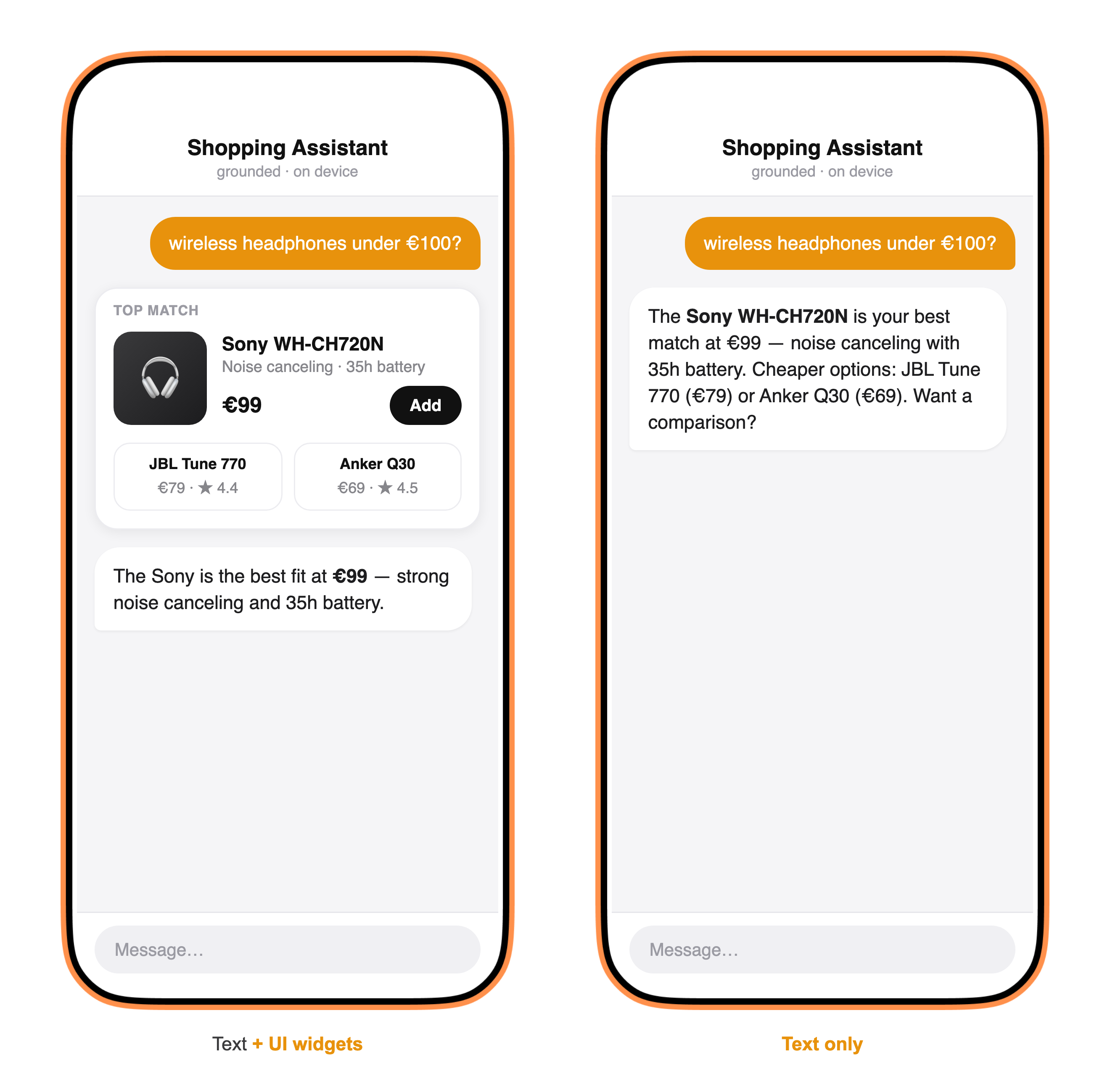
The same agent and the same tool data produce either of these. On the left, the tool’s UIPayload — typically delivered from an MCP server — is emitted as a .widget event and the host renders the product card alongside the text. On the right, UIPolicy.suppress (or a tool with no UI) yields a text-only answer. The widget’s structuredContent is render-only and is never fed back to the model.
See Built-in Curators for the ToolOutputCurator implementations that ship with AgentSquad, or Custom Curator for rolling your own.
UIPolicy
Section titled “UIPolicy”public enum UIPolicy: Sendable { case forward // emit AgentEvent.widget — the app renders the component case suppress // data stays text-only; widget is never emitted}Both Agent and GroundedAgent accept ui: UIPolicy (default .forward). With .forward, every ToolResult whose ui property is non-nil emits a .widget(UIPayload) event through the stream. With .suppress, the data still reaches the model via the tool-result message — nothing is lost, just never surfaced as a component.
// Text-only agent — no widgets emittedlet agent = Agent(    name: "Scores",    model: client,    tools: scoreTools,    ui: .suppress)
// Widget-emitting agent (the default)let agent = Agent(    name: "Scores",    model: client,    tools: scoreTools    // ui: .forward is the default)
Consuming .widget events
Section titled “Consuming .widget events”for try await event in agent.process(input, history: history, context: ctx) { switch event { case .textDelta(let delta): appendText(delta) case .widget(let payload): renderWidget(payload) case .final: break default: break }}UIPayload
Section titled “UIPayload”The value emitted on .widget:
public struct UIPayload: Sendable, Codable, Hashable { public let resourceURI: String // e.g. "ui://sport/matches" public let mimeType: String // e.g. "text/html;profile=mcp-app" public let template: UITemplate? // nil until lazily fetched via resources/read public let structuredContent: JSONValue // data the component hydrates from public let meta: JSONValue? // widget-only metadata; absent when none public let security: UISecurity? // CSP / permissions / sandbox domain}template is populated lazily when the host calls resources/read for resourceURI. Until then it is nil — the widget can still render if the host already has the template cached.
UITemplate
Section titled “UITemplate”The resolved resource content:
public enum UITemplate: Sendable, Codable, Hashable { case html(String) // text/html;profile=mcp-app case url(URL) // text/uri-list case remoteDOM(String) // application/vnd.mcp-ui.remote-dom}UISecurity
Section titled “UISecurity”Controls the Content Security Policy your host enforces when rendering the component. Undeclared domains are blocked.
public struct UISecurity: Sendable, Codable, Hashable { public let connectDomains: [String] // fetch / XHR / WebSocket public let resourceDomains: [String] // img, media, fonts public let frameDomains: [String] // iframe src public let permissions: [String] // e.g. "camera", "microphone", "geolocation" public let domain: String? // dedicated sandbox origin public let prefersBorder: Bool}ToolVisibility
Section titled “ToolVisibility”Declares which audiences may invoke a tool — set on AgentTool and propagated from MCP via _meta.ui.visibility.
public struct ToolVisibility: OptionSet, Sendable, Hashable { public static let model = ToolVisibility(rawValue: 1 << 0) public static let app = ToolVisibility(rawValue: 1 << 1) public static let all: ToolVisibility = [.model, .app] // default}A tool with .app-only visibility is never offered to the model in LLMRequest.tools, so the model cannot call it — only the UI component can.
let appOnlyTool = AgentTool( name: "refreshWidget", description: "Refresh the live scores widget", visibility: .app // model never sees this tool)GroundedAgent and UIPolicy
Section titled “GroundedAgent and UIPolicy”In a GroundedAgent, the gatherer always runs with .suppress — widgets are held back until after curation. The primary tool’s UIPayload is then emitted once, before the presenter speaks, so the widget arrives ahead of the text answer.
let agent = GroundedAgent( name: "Sport", gatherer: fastModel, presenter: preciseModel, tools: sportTools, curator: .dataBlock, presenterPrompt: .default, ui: .forward // widget emitted from the primary tool before presenter text)Set ui: .suppress on a GroundedAgent to produce a pure text answer with no widget, while still using the two-LLM grounding pipeline.
Related
Section titled “Related”- Built-in Curators —
DataBlockCurator,PerToolCurator,PresenterPrompt - Custom Curator — conforming to
ToolOutputCuratorfor domain-specific layouts - GroundedAgent — the two-LLM gatherer/presenter pattern
- Agents Overview — base
Agentand howUIPolicyis applied per tool call - MCP Overview — how
ToolVisibilityandUIPayloadare populated from MCP server metadata - Messages & Events —
AgentEventand the full event stream shape