GroundedAgent
GroundedAgent is the framework’s answer to LLM hallucination in tool-driven answers: two models, not one. The Brain calls tools and produces raw output; the Presenter turns that output into the reply. Because the Presenter has no tools, no chat history, and no tool responses — only the curated feed plus a small prompt — it cannot invent values beyond what was actually fetched.
A chit-chat turn that calls no tools skips the Presenter entirely: the Brain answers directly in one pass.
The same Brain → tool output → Presenter pattern also powers the realtime voice runtime.
How it works
Section titled “How it works”User question │ ▼ [ Brain / gatherer ] • full system prompt ← gathererPrompt • chat history • tools (ToolProvider) • runs tool-call loop • never speaks to user │ ▼ captured tool results [ ToolOutputCurator ] ← curator (default: .dataBlock) • curate() → feed string │ ▼ [ Presenter ] • no tools, no history • per-turn prompt ← presenterPrompt.resolve(primaryTool:) • input: question + feed • streams the final replyTool calls are emitted as .toolCall events for observability. If the primary tool carries a Tool UI, a .widget event is emitted before the Presenter streams its text (controlled by ui:).
public init( name: String, description: String = "", gatherer: any LLMClient, presenter: any LLMClient, tools: any ToolProvider, curator: any ToolOutputCurator = .dataBlock, gathererPrompt: String? = nil, presenterPrompt: PresenterPrompt = .default, presenterInput: PresenterInput = .questionAndData, ui: UIPolicy = .forward, maxToolRounds: Int = 20, saveChat: Bool = true)| Parameter | Notes |
|---|---|
gatherer | The Brain LLM — handles tool calls, full context. Any LLM client. |
presenter | The Presenter LLM — can be cheaper/smaller; never calls tools. |
tools | Any ToolProvider: native Swift tools, MCP, or a mix. |
curator | Shapes the gathered results into the text feed. Default: .dataBlock (one ### toolName section per call). |
gathererPrompt | Brain system prompt. Omit for a no-system-prompt Brain. |
presenterPrompt | Per-tool presenter prompts. Default: a generic “present only the data” instruction. |
presenterInput | What the Presenter sees besides its prompt. .questionAndData (default): this turn’s question plus the curated feed, so it answers the user directly. .dataOnly: the feed alone — a pure explainer. It never sees chat history or the Brain’s transcript in either mode. |
ui | .forward (default) emits a .widget event when the primary tool has a UI. .suppress folds everything into text. |
maxToolRounds | Cap on Brain tool-call iterations. Default: 20. |
Minimal example
Section titled “Minimal example”import AgentSquad
let brain = ChatCompletionsClient(model: "gpt-4o", apiKey: apiKey)let voice = ChatCompletionsClient(model: "gpt-4o-mini", apiKey: apiKey)
let agent = GroundedAgent( name: "Shop", description: "Product search with grounded answers.", gatherer: brain, presenter: voice, tools: myToolProvider, gathererPrompt: """ You are the data brain of a shopping assistant. GATHER the facts needed to answer the user — never write the final reply.
Tools: search_products(query, max_price) → matching products get_product(id) → details · price · rating · stock get_order(id) → order + delivery status
Rules: - Call whatever tools you need; you may chain several. - Use the chat history to resolve follow-ups ("cheaper ones?", "is it in stock?"). - Never invent values. If a tool returns nothing, note that. - Do NOT address the user or format anything — the presenter does that. """)Drop the agent into an Orchestrator unchanged:
let orchestrator = Orchestrator(    agents: [agent],    store: try DeviceChatStorage(userId: "u1", inMemory: true))
for try await event in orchestrator.route(.text("wireless headphones under €100?"),                                          userId: "u1", sessionId: "s1") {    if case .textDelta(let token) = event { print(token, terminator: "") }}
PresenterPrompt
Section titled “PresenterPrompt”PresenterPrompt selects the Presenter’s system prompt based on which tool drove the turn. Supply one default, plus optional per-tool overrides:
public struct PresenterPrompt: Sendable { public init(default defaultPrompt: String, perTool: [String: String] = [:]) public func resolve(primaryTool: String?) -> String public static let `default`: PresenterPrompt}The primary tool is the last tool call that advertised a UI, or the last call overall if none had a UI.
Per-tool prompts
Section titled “Per-tool prompts”Different data warrants different presentation instructions. Map tool names to prompts; unmapped tools fall back to the default:
let presenterPrompt = PresenterPrompt( default: """ You are presenting information to the user. Use ONLY the data provided. Be concise and \ natural, and never invent or infer values that are not present in the data. """, perTool: [ "search_products": """ You are presenting product search results. Use ONLY the data block provided — never invent a price, rating, name, or stock status. Lead with the best match: its name and price, then one standout detail. Two short sentences, natural tone. Do not call tools. """, "get_order": """ You are presenting an order status. State the order ID, current status, and estimated \ delivery in one sentence. Use only the data provided. """ ])ToolOutputCurator
Section titled “ToolOutputCurator”The curator transforms captured tool results into the text string the Presenter is fed. The protocol is a single synchronous method:
public protocol ToolOutputCurator: Sendable { func curate(_ results: [CapturedTool]) -> String}Two built-in curators ship with the framework:
.dataBlock (default) — one ### toolName section per captured call, with the tool’s text content or pretty-printed structured data:
GroundedAgent(/* … */, curator: .dataBlock).perTool([:]) — route each tool to its own formatter; unmapped tools fall back to the lossless dataBlock section. Use this to trim oversized payloads before the Presenter sees them:
GroundedAgent( /* … */, curator: .perTool([ "search_products": { tool in // keep only the top 3 results to stay within context budget /* … */ return "### search_products\n\(trimmed)" } ]))Custom curators implement ToolOutputCurator directly.
Text answer, or text + UI widget
Section titled “Text answer, or text + UI widget”Because grounding is decoupled from presentation, the same GroundedAgent can answer
either as plain text or as text plus an interactive UI widget — the difference is only
whether the primary tool advertises a Tool UI (typically delivered from an
MCP server) and what ui: is set to.
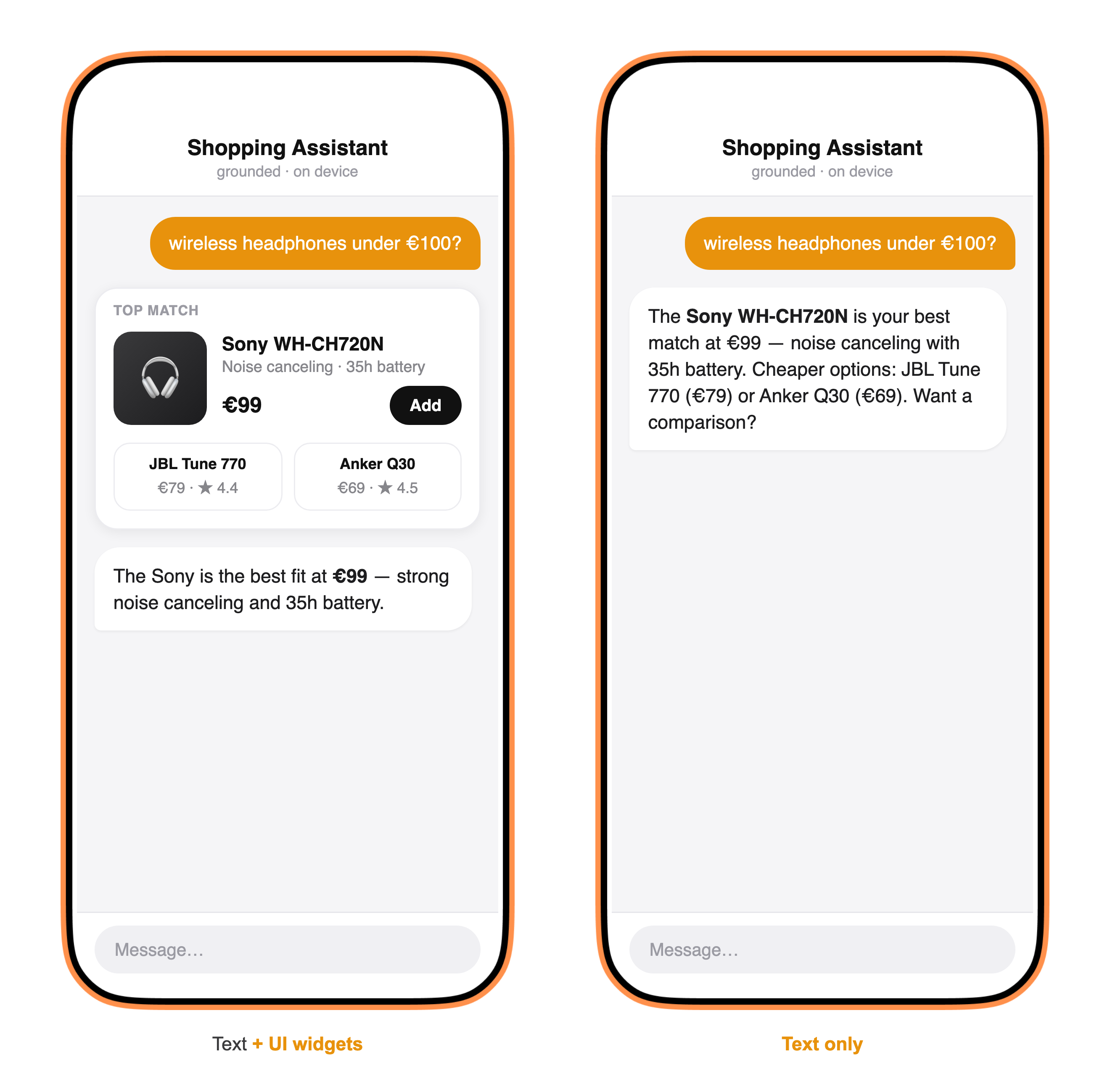
When the primary tool carries a UI payload and ui: .forward (the default), a .widget event
is emitted before the Presenter streams its text — so the product card appears, then the
grounded sentence underneath it (left). Set ui: .suppress, or use a tool with no UI, and you
get the identical grounded answer as text only (right). The widget data never reaches the
Presenter, so it can’t be hallucinated from — see UI.
UIPolicy
Section titled “UIPolicy”public enum UIPolicy: Sendable { case forward // emit .widget when the primary tool has a UI (default) case suppress // fold everything into the text answer}See UI for how tool UI payloads are declared and consumed.
No-tool turns
Section titled “No-tool turns”When the Brain makes no tool calls, GroundedAgent emits the Brain’s own reply directly and skips the Presenter. This handles chitchat, clarifying questions, and fallback answers without paying an extra LLM call.
Relation to other types
Section titled “Relation to other types”GroundedAgentimplementsAgentProtocolidentically toAgent, so it is interchangeable at the Orchestrator call site.- The Brain is internally an
Agentwithui: .suppressandsaveChat: false; the Presenter is anAgentwithtools: nil. - Tool calls flow through any
ToolProvider, including MCP tools. - The same grounding logic drives the realtime voice runtime via a shared
Groundinghelper. - Each turn produces trace spans for the gatherer and presenter phases. See Tracing.